
📏 Arduino Object Width Measurement System Using Two Ultrasonic Sensors 🤖
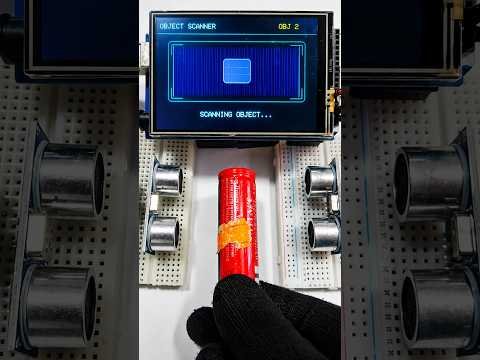
In this project, I built a real-time object width measurement system using an Arduino, two ultrasonic sensors, and a 3.5-inch TFT display.
The two ultrasonic sensors are mounted facing toward the measurement area from opposite sides. The distance between the two sensors is fixed and known.
When an object is placed between the sensors, the Arduino measures the distance from the left sensor to the object and then the distance from the right sensor to the object.
The width is calculated using:
Object Width = Fixed Distance Between Sensors − (Left Sensor Distance + Right Sensor Distance)
Example:
Sensor spacing = 20 cm
Left distance = 8.5 cm
Right distance = 8.5 cm
Object width = 20 − (8.5 + 8.5)
Object width = 3.0 cm ✅
The ultrasonic sensors are triggered separately to help prevent interference between them.
The TFT display first shows the robot face, then the scanning interface, and finally displays the measured width of the object.
Components:
• Arduino Mega
• 3.5″ TFT Display Shield
• 2 × Ultrasonic Sensors
• Jumper wires
• Fixed measurement frame
This project can be used as a simple contactless width measurement prototype for small objects.
Subscribe for the Arduino code, circuit diagram, and more electronics projects! 🔥